


If you work insurance claims, you'll spend time in Xactimate. It's the claims estimating software adjusters and restoration contractors use to price a loss line by line, and on a roof claim, the roofing lines start with the roof's measurements.
What is Xactimate?
Xactimate is property claims estimating software from Verisk. Carriers, adjusters and restoration contractors use it to build the estimate for a damaged property: every repair as a line item, with pricing for the local market built in. It runs on desktop, online and mobile.
Claims move between the people working them through XactAnalysis, Verisk's claims network. Assignments come in with the loss file attached, and finished estimates go back out in Xactimate's file format, ESX.
Verisk says its property solutions are used and trusted by 80% of the top property insurance carriers. When the carrier's estimate is written in Xactimate, your scope and any supplement get read against it.
Why contractors working claims need an Xactimate workflow
For a restoration contractor, Xactimate isn't software you might get around to trying. It's where the claim lives. Working in the same format as the adjuster means fewer numbers to reconcile and fewer roofs to redraw.
That's also why integration matters when you pick a measurement partner. In claims work, many restoration companies and adjusters won't work with a measurement partner that doesn't connect to Xactimate. A report that has to be redrawn by hand is one more step, and one more place for a number to change.
What Xactimate needs from a roof measurement
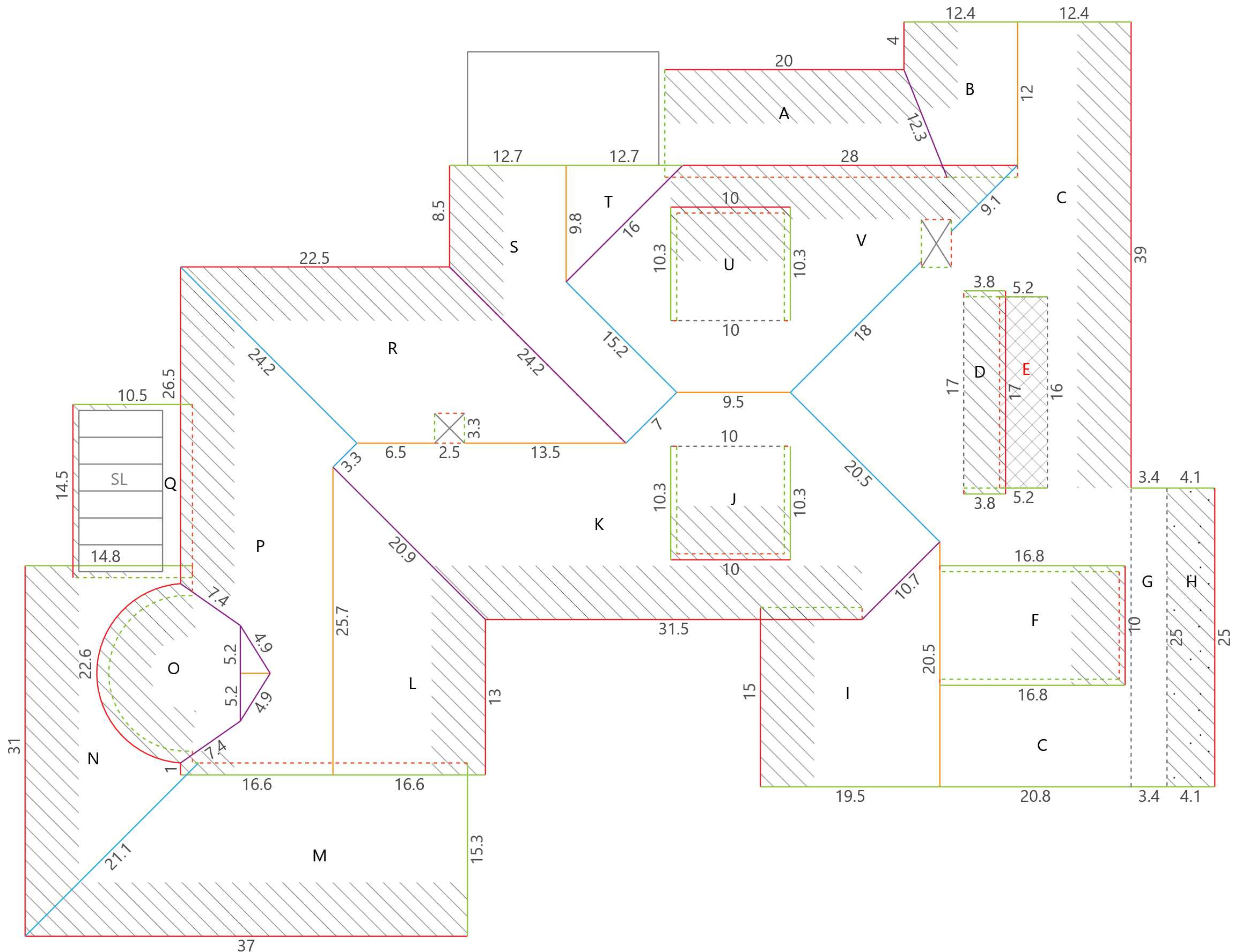
A roof in Xactimate is built from a sketch. The sketch holds each roof facet, its pitch, and the length of every edge. Those numbers drive the roofing line items, starting with roofing squares (RSQ).
The edges matter as much as the area. Eaves, rakes, ridges, hips and valleys each carry their own materials, so each one needs its own measured length. RoofScope and RoofScope+ reports include eave, rake, ridge, hip and valley measurements.
If the sketch is wrong, every line item built on it is wrong too.
What is an ESX file?
ESX is Xactimate's project file format. When a measurement report comes with an ESX file, the roof arrives in Xactimate as a sketch, with facets, pitch and line lengths already in place.
If you only have a PDF and no usable sketch file, someone on your team or the adjuster's may need to redraw the roof. That works, but it takes time, and every redraw is a chance for a line to come out different from the report.
Two ways to get RoofScope measurements into Xactimate

Option 1: Order from inside Xactimate
Once your account is enabled for the Xactimate integration, you can send a request to RoofScope from inside your Xactimate project. When the report's done, the measurement package, the PDF report plus the sketch file, is delivered into that same project.
This is the cleanest route if your estimators or your adjusters already work in Xactimate every day, since nothing has to be downloaded or moved.
Option 2: Order on roofscope.com and add an ESX file
Turn on ESX files on your My Details page. You only do this once.
Place your order as usual. You'll now see the option to add an ESX file at checkout.
When the report's done, download the ESX file and import it into Xactimate. To use the imported roof in an existing estimate, follow the copy or merge workflow for your Xactimate version.
Already have a completed report? You can add an ESX file to it from your My Scopes page. That's useful when an older job turns into a claim.

Which RoofScope reports come with an ESX file?
ESX files are available for our roof reports: RoofScope, RoofScope+ and RoofScopeX. The ESX file carries the roof sketch. Gutter, siding and other exterior measurements stay in the PDF report that comes with your order.
Checklist: set up your Xactimate workflow before the next claim
Turn on ESX files in My Details, so the option's there the day a claim job comes in.
If you or your adjusters work in Xactimate, request Xactimate enablement now, not on a busy call day.
Test it on one job. Order, import, and compare the sketch to the PDF report.
Keep the PDF report in the claim file. It's the version anyone on the job can open.
Run through the rest of your storm-season readiness checklist: logins, report defaults and integrations.
Why accuracy matters more when the sketch drives the line items
Once a measurement is inside Xactimate, it doesn't stay in one place. It flows into squares, edge materials and every line priced from them. If it's off, you find out later, in a supplement or a disputed scope.
Every RoofScope report is drawn and verified by a CAD technician and backed by our 99% accuracy guarantee. When trees hide part of the roof, we pull from multiple imagery sources across a range of years to find a view that actually shows it.
Common questions
Do roofing contractors need Xactimate?
If you work insurance claims, it helps. Carriers and adjusters write estimates in it, so working in the same format makes scopes and supplements easier to line up. If you only do retail work, you may not need it.
What's an ESX file?
It's Xactimate's project file format. A measurement report with an ESX file brings the roof into Xactimate as a sketch, so nobody has to redraw it.
Can I add an ESX file to a report I already have?
Yes. You can add an ESX file to a completed report from your My Scopes page.
Can I order RoofScope from inside Xactimate?
Yes. Once your account is enabled for the integration, you can send requests to RoofScope from inside Xactimate, and the measurement package is delivered into your project.
Get your roof measurements into Xactimate
New to RoofScope? Book a demo to see how RoofScope fits your claims workflow.
Already a customer? Turn on ESX files in My Details, or ask your account manager about Xactimate enablement.
Xactimate, XactAnalysis and Xactware are trademarks of Verisk.
written by RoofScope published on 11. 03. 2026